오랜만에 Jupyter 실행을 했더니 왠 이상한 화면이 뜬다. "Token authentication is enabled". 무슨 token을 쳐서 로그인을 하라는 것 같다.
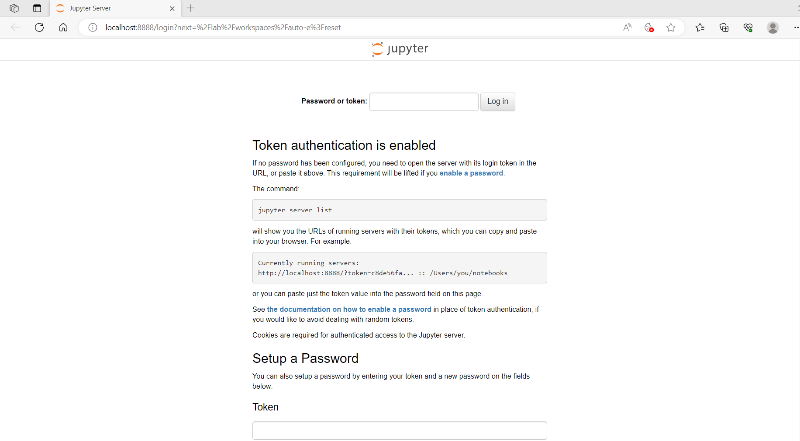
구글링을 하니 역시 이미 해결사들이 있다. 대부분의 경우 anaconda prompt에 jupyter notebook list를 치면 token이 나온다고 해서 따라해본다. 왠걸? 난 아무리 쳐도 "Currently running servers:" 라고만 뜬다. 나의 경우, jupyter notebook list가 아닌 jupyter server list를 치니 두가지 token 번호가 나오더라.
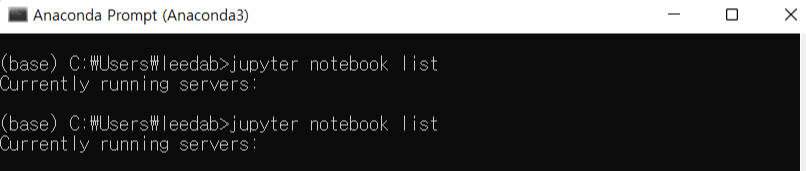
jupyter notebook list가 아닌 jupyter server list!

저 두가지 중 하나의 token 넘버를 치면 notebook 실행이 된다. http://부터 컴퓨터 user명 직전까지 번호를 copy & paste.
http://localhost:8889/?token=da14ab4e06f53061185ca4c4bca661503134819b384fad5a 까지 복사해 입력하였더니 접속이 된다. 이제 접속도 되었고, 오늘은 타이타닉 튜토리얼을 해봐야지.
'Data Science' 카테고리의 다른 글
| [programming] 기본 용어 정리 (0) | 2023.06.30 |
|---|---|
| [python] data science tutotial for beginners (1) (0) | 2023.06.29 |
| [kaggle] 캐글(kaggle) 시작하기 (0) | 2023.06.28 |
| [직장] Data scientist, 새로운 시작 (0) | 2023.06.27 |


